
One wrong character in a URL can take down a page, break an API call, or silently kill your tracking data. Most developers and marketers don’t realize the damage until something stops working. And half the time, it started with a URL encoding mistake that took ten seconds to make and hours to find.
What “URL Encoder Spell Mistake” Actually Means
The phrase blends two separate problems into one search query. It usually means one of two things:
- A literal typo inside a URL — a misspelled word that gets encoded correctly but still sends users or bots to the wrong place
- A percent-encoding error — incorrect use of encoding rules, wrong characters, or broken encoding logic
The important thing to understand: encoding does not fix spelling. If you encode a misspelled URL, you get a perfectly formatted broken link. The encoding process transforms characters into a web-safe format. It does not validate, correct, or check what you typed.
What URL Encoding Is (and Why It Exists)
URLs can only carry a limited set of safe characters. Spaces, ampersands, question marks, and non-ASCII characters like accented letters or Chinese characters need to be converted before a browser or server can handle them cleanly.
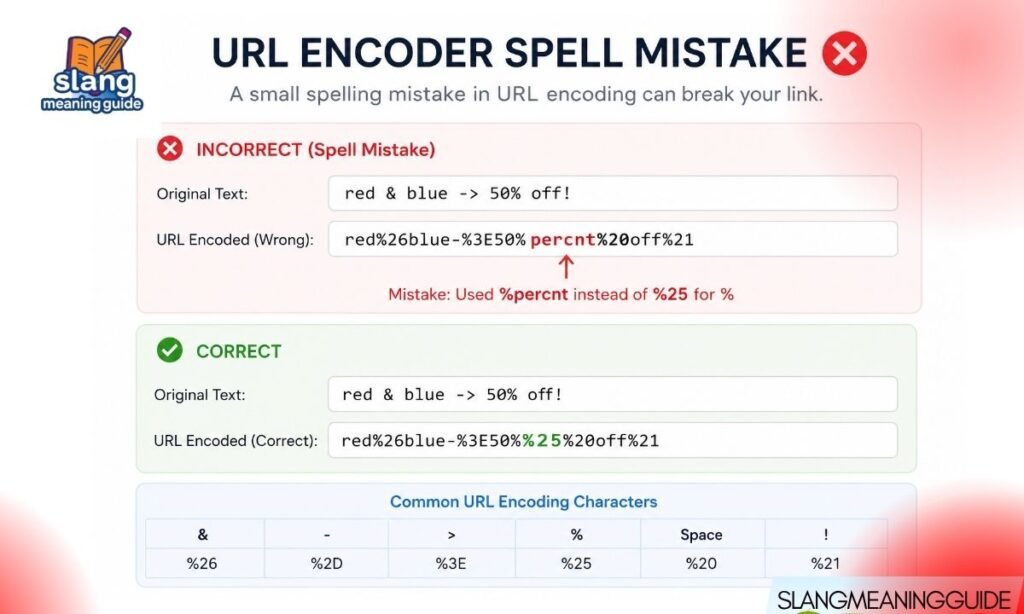
URL encoding — also called percent-encoding — replaces unsafe characters with a % sign followed by two hexadecimal digits:
- Space → %20
- Ampersand → %26
- Plus sign → %2B
- Non-ASCII (e.g., é) → %C3%A9 (UTF-8 encoded)
This process follows RFC 3986, the standard that defines how URIs are structured. Every character in a URL falls into one of two buckets: reserved (structural, like /, ?, =) or unreserved (safe to use as-is, like letters and numbers).
Why These Mistakes Are So Common
Most encoding errors are not random. They follow predictable patterns:
- Manual editing of encoded strings — encoded values look cryptic; one changed character corrupts the whole sequence
- Mixing encoding functions — using encodeURI where encodeURIComponent is needed, or vice versa
- Encoding data that is already encoded — producing double encoding like %2520 instead of %20
- Confusing + with %20 — both represent spaces but behave differently depending on context
- Encoding the full URL instead of just one component — which breaks structural characters like / and ?
The Most Damaging Mistake: Double Encoding
Double encoding happens when an already-encoded string gets encoded a second time. The % character itself gets encoded as %25, so %20 becomes %2520.
Here is what that looks like in practice:
- Original: hello world
- First encode: hello%20world ✓
- Second encode: hello%2520world ✗
The server receives %2520, decodes it once to %20, and stops there — treating it as literal characters rather than a space. The result is a broken or unreadable value. Double encoding is one of the hardest bugs to spot visually, because the URL still looks like it has valid percent-encoding.
encodeURI vs encodeURIComponent: The Function Confusion
This is the single most common programming mistake in URL encoding. Both JavaScript functions encode characters, but they encode different things.
- encodeURI() — encodes a complete URL; leaves structural characters like /, ?, =, &, and : untouched
- encodeURIComponent() — encodes a single URL component; encodes almost everything, including /, ?, and =
When to use which:
- Encoding a query parameter value → use encodeURIComponent()
- Encoding a path segment → use encodeURIComponent()
- Encoding an entire URL you did not build yourself → use encodeURI() (rare)
Using encodeURI() on a query value leaves & and = unencoded, which silently breaks parameter parsing. Using encodeURIComponent() on a full URL encodes the slashes and colons, making the URL unreadable.
Platform-Specific Encoding Functions
Different languages handle encoding differently. Using the wrong one is a common source of silent bugs.
JavaScript:
- encodeURIComponent(‘hello world’) → hello%20world
- encodeURI(‘https://example.com/hello world’) → https://example.com/hello%20world
- URLSearchParams — handles query parameter encoding automatically; best default choice
PHP:
- urlencode() → encodes spaces as + (form-style)
- rawurlencode() → encodes spaces as %20 (RFC 3986 compliant)
- Use rawurlencode() for URL components, urlencode() for HTML form data
Python:
- urllib.parse.quote() → percent-encodes a string component
- urllib.parse.urlencode() → encodes a dictionary of query parameters
Encoding the Wrong URL Component
A URL has distinct parts, and each one has different encoding rules:
| URL Part | Example | Should You Encode? |
| Protocol | https:// | No |
| Domain | example.com | No |
| Path segment | /search/hello world | Encode the segment text only |
| Query parameter name | ?q= | Encode the name |
| Query parameter value | =hello world | Encode the value |
| Fragment | #section one | Encode the fragment text |
The most common error is encoding the entire URL as if it were a single value. That converts the :// in https:// and the / between path segments, making the URL completely unreadable to a server.
The %25 Problem: What It Means When You See It
If %25 appears in your URL, something has been double-encoded. The % sign has a percent-encoded value of %25. So when encoding runs over an already-encoded string:
- %20 (space) becomes %2520
- The % becomes %25, and 20 stays as 20
If you see %25 in a live URL, your encoding pipeline is running twice. Check for:
- Middleware that encodes before your code does
- Framework auto-encoding combined with manual encoding in the same request
- CMS plugins that encode URLs before passing them to a redirect handler
How Spaces Get Mishandled
Two different standards encode spaces two different ways, and mixing them causes silent failures:
- RFC 3986 (standard URL encoding) → space = %20
- HTML form encoding (application/x-www-form-urlencoded) → space = +
PHP’s urldecode() converts + back to a space. PHP’s rawurldecode() does not. If your backend uses the wrong decoder for your encoding method, spaces silently become + literal characters or break the string entirely.
The safe default: use %20 for spaces in URLs unless you are specifically handling HTML form submission data.
Non-ASCII and UTF-8 Encoding Errors
Characters outside the basic ASCII set — accented letters, Arabic, Chinese, emoji — need to be converted to UTF-8 bytes first, then percent-encoded. If your tool or code skips the UTF-8 step, the encoded output will be wrong.
Common failures:
- Encoding é as %E9 (Latin-1) instead of %C3%A9 (UTF-8)
- Emoji in URLs showing as corrupted characters on some servers
- Multilingual query parameters breaking on backends that expect ASCII
Modern browsers handle UTF-8 encoding automatically in the address bar, but server-side code and API clients do not always follow suit. Always specify UTF-8 explicitly when encoding non-ASCII input.
How URL Encoding Mistakes Break SEO
URL encoding errors are not just a developer problem. They directly affect how search engines crawl and rank your pages.
Problems encoding errors cause for SEO:
- Duplicate content — example.com/page and example.com/page%20 look like different URLs to a crawler
- Crawl budget waste — Googlebot follows broken or double-encoded URLs and hits dead ends
- UTM tracking loss — double-encoded UTM parameters like utm_source=google%2520ads never reach Google Analytics correctly
- Redirect failures — malformed destination URLs in 301 redirects produce redirect chains or 404s
- Inconsistent canonical signals — encoding inconsistency across internal links confuses which version should rank
Google Search Central explicitly recommends consistent, clean URL structures. Inconsistent encoding is one of the most common technical SEO issues in site audits.
URL Encoding Mistakes in Marketing and Tracking Links
Marketers building campaign URLs, affiliate links, and ad destination URLs run into encoding errors just as often as developers. The stakes are different but the damage is real.
- UTM parameters with spaces break if not encoded as %20
- Ampersands (&) inside parameter values must be encoded as %26; unencoded & splits one parameter into two
- Redirect URLs passed as query parameters must be fully encoded — an unencoded ? or = inside a redirect value breaks the outer URL’s structure
- URL shorteners sometimes add a layer of encoding on top of an already-encoded URL, producing double-encoded long URLs when unwrapped
Test every tracking link in a URL decoder before publishing. If the decoded version does not match your intent exactly, fix the source.
How to Fix a Broken Encoded URL: Step by Step
- Step 1 — Paste the URL into a decoder. See what the raw decoded string looks like
- Step 2 — Identify the problem: literal %25, unencoded reserved characters, extra + signs, or broken UTF-8 sequences
- Step 3 — Go back to the source. Fix the unencoded input string, not the encoded output
- Step 4 — Encode each component separately using the correct function
- Step 5 — Assemble the full URL from the encoded parts
- Step 6 — Test in browser DevTools (Network tab) — inspect the actual request your app sends, not what you typed
Never try to manually edit a percent-encoded string character by character. Fix the source, re-encode correctly, and verify the output.
Quick Troubleshooting Checklist
Run through this before you publish or deploy any URL:
- Does %25 appear in the URL? → Double encoding; find where encoding runs twice
- Does the URL contain literal spaces? → Missing encoding
- Are & or = appearing inside a parameter value? → Encode them as %26 and %3D
- Are slashes encoded inside a path that should remain navigable? → Wrong function used; switch to encodeURIComponent per segment
- Do non-ASCII characters look garbled? → Missing or incorrect UTF-8 encoding
- Do UTM parameters arrive correctly in analytics? → Decode the received URL and compare to the original
Best Practices to Prevent Encoding Errors
Build these habits and most URL encoding problems stop before they start:
- Encode at one point only — define a single encoding step in your pipeline; never encode input you did not build
- Use built-in library functions — URLSearchParams in JavaScript, urllib.parse in Python; avoid writing your own encoding logic
- Always pass raw, unencoded data into your encoding function — the function’s job is to encode, not to re-encode
- Test with special characters — run hello world, café, hello&world, and 100% through your URL before going live
- Decode before re-encoding — if you are unsure whether input is already encoded, decode it first, then encode once
- Keep structural characters out of encoded values — /, ?, #, and & belong in the URL structure, not inside parameter values
Frequently Asked Questions
What is a URL encoder spell mistake?
It refers to either a literal typo inside a URL that encoding preserves unchanged, or a percent-encoding error like double encoding, wrong function use, or missing character escaping.
What causes %25 to appear in a URL?
Double encoding — the % sign itself gets encoded as %25 when an already-encoded string gets encoded a second time.
Should I encode the whole URL or just the parameters?
Encode each component separately — specifically the parameter names and values. Never run the entire URL through encodeURIComponent, or it will encode the structural characters that make the URL work.
What is the difference between encodeURI and encodeURIComponent?
encodeURI encodes a full URL and leaves structural characters intact. encodeURIComponent encodes a single component and encodes almost everything, including /, ?, and =. For query parameter values, always use encodeURIComponent.
Can URL encoding errors hurt SEO?
Yes. Inconsistent encoding creates duplicate URLs, wastes crawl budget, breaks UTM tracking, and causes redirect failures — all of which affect how Google crawls and ranks your pages.
URL encoding mistakes are small in size and large in consequence. A misplaced %, a doubled encoding pass, or one wrong function call can break links, lose analytics data, and confuse search engines. The fix is always the same: encode the right component, use the right function, encode exactly once, and test with real input before anything goes live.